What does MCP security actually have to check?
MCP security is the set of checks between a model asking for a tool and that tool actually running. We think about it as five questions. Which exact tool is the model allowed to name? Has that tool changed since anyone approved it? Does this call change anything outside the run? Who holds the credential for the call? Where is the request allowed to go?
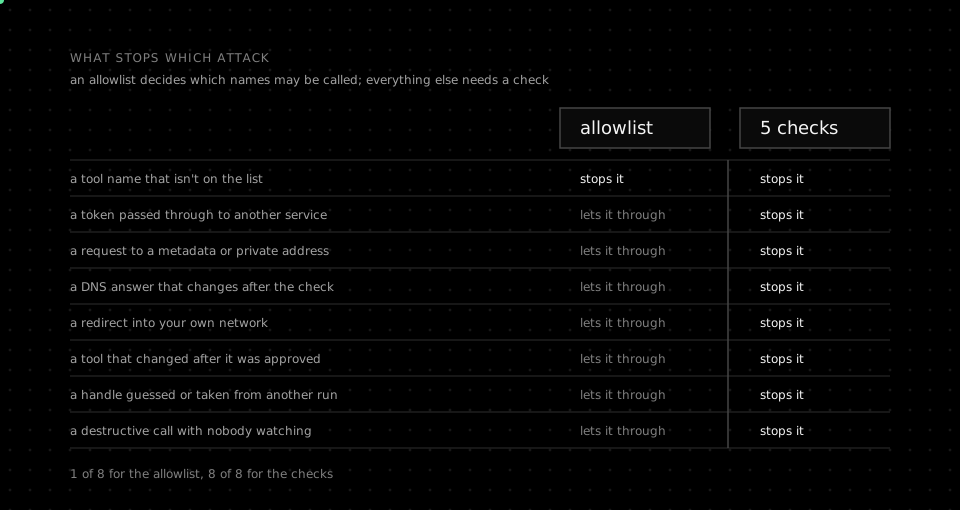
An allowlist answers the first question and nothing else. Most MCP security advice stops there, and that's where the trouble starts. A tool that was safe yesterday can change its parameters today. A server you trust can redirect a request to your cloud metadata endpoint. A token issued for one service can be forwarded, unchanged, to another one.
We'll take each question in turn, with what the MCP specification says about it and what we think it leaves to you. Then we'll show how we built each check, with the numbers taken straight from our source.
What goes wrong in an MCP tool call?
The specification's Security Best Practices page lists the attacks, and it's worth reading in full before you connect anything. We group what can go wrong by where the damage lands, because each group needs a different check.
The first attack is token passthrough. An MCP server that accepts a token issued for some other service, then forwards it downstream, becomes a confused deputy. The downstream API trusts a token it shouldn't, and nobody can tell from the logs who really made the call. The specification is blunt here: servers must not accept tokens that weren't issued for them.
The second is server-side request forgery. A malicious server can hand your client a URL that points at 169.254.169.254 or a Redis port on localhost. It can also hand over a hostname that resolves to a public address once and a private one the next time. Your client then fetches it from inside your network, with your network's reach.
The third is state handle hijacking. MCP is stateless, so servers mint handles for carts, workflows and jobs, then take them back as ordinary tool arguments. If possession of a handle counts as authentication, anyone who guesses one inherits whatever state sits behind it.
The fourth isn't a separate heading in the specification, but we treat it as one. A tool can keep its name while its description and parameters change underneath it. The model then calls something that no longer matches what anyone reviewed, and the allowlist still says yes, because the name still matches.
The fifth is the plain one. A tool called send_invoice or delete_branch does exactly what its name says. The model will call it when the conversation points that way, and nothing in the protocol will stop it. None of these five is fixed by making an allowlist longer.
Where should MCP credentials live?
Credentials should live on the far side of the boundary from the model. The model never needs to see a token to use a tool. Anything it does see can end up in a transcript, a log line, a summary, or the arguments of the next tool call.
In practice that means the component that talks to MCP servers resolves credentials itself, per call, and throws them away afterwards. It shouldn't cache them, log them, or hand them back to whatever asked for the call. Whoever configured the connection decides which credential applies, and the model only ever names the operation it wants.
Header templating is where passthrough tends to creep back in. A value like ${API_TOKEN} looks harmless until the expander reads whatever environment the process happens to have. One exact placeholder for one known header is far safer than general expansion. General expansion is how a secret meant for one provider ends up in a request to another.
We also keep workspaces apart at the provider. When a connected-app provider needs a user id, we give it an opaque value derived from the workspace, not the workspace id itself. The provider can't read our identifiers, and nobody can guess another workspace's value from their own.
How do you stop SSRF through MCP?
The specification's advice on SSRF is unusually specific, and we follow all of it. Require HTTPS for every production endpoint. Refuse private, loopback and link-local ranges, which covers the cloud metadata address. Apply the same rules to every redirect. Watch for DNS answers that change between the check and the connection.
That last one is the check most implementations skip. Validating a hostname once proves very little, because the attacker controls the DNS answer. A name can resolve to a public address while you validate it, then to 10.0.0.1 when the connection actually opens. The fix is to check the address again at dial time, on the address you're about to connect to.
Redirects deserve exactly the same suspicion. A friendly URL that answers with a redirect to an internal host is the oldest SSRF trick in the book. We hold redirects to the rules of the original request, and we don't let a redirect move to a different host at all.
Two limits belong here too, even though they aren't about addresses. Every call needs a deadline, so a hostile or broken server can't hold a run open indefinitely. Every result needs a size cap, so one tool can't flood the model's context with a few hundred megabytes of text.
What about MCP servers that run on your own machine?
Local MCP servers are the case the specification worries about most, and it's right to. A local server is a program you downloaded and ran with your own privileges. It can read your SSH keys, your shell history and every repository on the disk, whatever its tool list says it does.
The specification asks clients to show the exact command before configuring a local server, and to run it in a sandbox with minimal privileges. We'd go further for anything unattended. A scheduled agent shouldn't run on a laptop at all, because the laptop is exactly the environment a compromised server would want to reach.
That's the reason we run agents in isolated cloud sandboxes rather than on the machine that configured them. A sandbox doesn't make a malicious server safe. It does mean the worst case is a disposable environment with the credentials of one run, not your workstation and everything signed in on it.
If you do run a server locally, the specification recommends the stdio transport, so that only the client that started the server can talk to it. A local HTTP server without a token is reachable by any page that can rebind a DNS name to your machine.
What should the model hold instead of a tool name?
The model should hold a handle that means nothing outside its own run. The specification's guidance on state handles applies directly: generate them randomly, let them expire, and bind them on the server to whoever received them. Possession alone must never be enough.
A handle can carry more than identity, and this is where it earns its keep. When we list a tool for the model, we record a hash of its exact input schema alongside the handle. When the model calls the tool, the hashes must still match. If the server changed the tool in the meantime, the call fails as stale instead of running something nobody reviewed.
Parameters get the same careful treatment. The model can work with friendly parameter names on a compact card. The call that leaves our side is mapped back to the provider's real names and validated against that exact schema. A call that doesn't fit the schema never reaches the server, so the model can't smuggle in a field the schema doesn't declare.
Which MCP calls should run without a human?
Only calls that we can positively classify as reads should run unattended. Everything else should wait for a person, and anything we can't classify counts as everything else. Failing closed is the whole point of the classification.
We sort every tool into one of six classes: read, reversible write, publish, financial, destructive, and unknown. Our own rules on the tool's action name come first, so a name containing delete, purge or revoke is destructive whatever the provider claims. Provider annotations can raise a class but never lower it. A tool whose rules say read, but whose annotations are missing or contradictory, becomes unknown instead of read.
This is what scope minimization looks like at call time. You can't predict every tool that a connected account will expose next month. You can decide, for each call, whether its class may run on its own. That decision survives new tools, renamed tools and tools you've never seen.
A confirmation is only as strong as what it's bound to. It should name the exact call a person approved, belong to that person, work once, and expire quickly. An approval that can be replayed, or reused for a different call, is just a slower way of saying yes to everything. We'd rather ask again than stretch one approval across two actions.
How do we enforce these checks in Orca?
In Orca, we built these checks around one service, the MCP bridge, which every connected-app call leaves through. Figure 01 shows the order a call passes through them. The right column is what comes back when a check refuses the call.
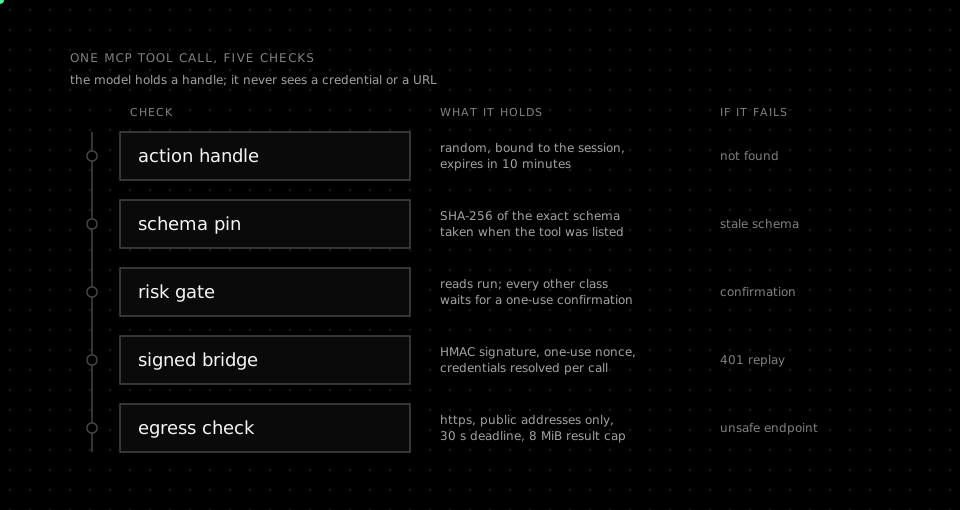
Action handles are 32 random bytes. We store only a digest, bind the handle to the agent and the session that received it, and expire it after ten minutes. A handle presented by another session, or after it expires, resolves to nothing at all. Each handle carries the SHA-256 hash of the tool's canonical input schema. A mismatch with the tool's current hash returns a stale-schema error, and the parameters are validated against that exact schema before anything is sent.
The risk gate is short enough to quote in full. A read runs straight away, with no prompt. Every other class, unknown included, turns into a confirmation challenge for an authenticated person. It can be redeemed once and expires after five minutes.
// EvaluateSafety permits automatic execution only for positively classified
// reads. Every state-changing or unclassified action fails closed to an
// authenticated one-use confirmation.
func EvaluateSafety(risk capabilities.Risk) SafetyDecision {
	if risk == capabilities.RiskRead {
		return SafetyDecision{Risk: risk, AutoExecute: true}
	}
	if !risk.Valid() {
		risk = capabilities.RiskUnknown
	}
	return SafetyDecision{Risk: risk, RequiresConfirmation: true}
}
Requests to the bridge carry an HMAC signature and a one-use nonce, stored in Redis for 60 seconds. The signature's timestamp must sit within 30 seconds of the bridge's clock, so a captured request can't be replayed. Credentials are resolved per call from an authorization proof for one binding and one operation. The resolved configuration expires, is never cached or logged, and allows exactly one header placeholder, for one provider's API key. Any other ${ in a header rejects the call.
The egress check refuses any endpoint that isn't HTTPS, carries credentials in the URL, or names localhost. Plain HTTP works only for a host and port an operator listed explicitly. The client resolves the name and refuses the call if any address isn't public, then resolves it again at dial time with the same rule. Proxies are switched off on this transport, and each call gets a 30 second deadline and an 8 MiB cap on its result. Redirects stay on the same host and port, never drop from HTTPS, and stop after five hops.
func (c *MCPClient) validateRedirect(ctx context.Context, initial, next *url.URL) error {
	if initial == nil || next == nil {
		return ErrUnsafeEndpoint
	}
	if initial.Scheme == "https" && next.Scheme != "https" {
		return ErrUnsafeEndpoint
	}
	if _, _, err := c.validateEndpoint(ctx, next.String()); err != nil {
		return err
	}
	if !strings.EqualFold(next.Hostname(), initial.Hostname()) || effectivePort(next) != effectivePort(initial) {
		return ErrUnsafeEndpoint
	}
	return nil
}
Every stage of a call also reports what happened, and nothing else. The bridge writes one log line per call with the route, the status and the duration, and never the request body, because the body carries the tool's arguments. Stage events carry a status, an error code and a duration. They never include arguments, binding ids, URLs, credentials or proofs. If a report fails to send, that's a gap in our telemetry, never a reason to repeat the call.
What should you check before shipping an MCP agent?
Before we let an agent run MCP tools unattended, we test each check by trying to make it fail. A check that has never refused anything in testing hasn't been tested yet.
- Credentials. Search transcripts, logs and tool arguments for every token the connection uses. None of them should appear anywhere the model can read.
- Egress. Point a test server at the metadata address, at localhost, and at a name that changes its DNS answer. Each one should fail before a connection opens.
- Redirects. Redirect from a public host to a private one, and from HTTPS to HTTP. Both of those requests should fail.
- Schema changes. Change a tool's parameters after the model has listed it. The next call should be refused as stale.
- Writes. Ask the agent to do something destructive in a sandbox account. It should stop and ask, and a reused approval should be refused.
- Limits. Make a tool hang, then make it return far too much. The run should see a clear error in both cases, not a hang or a flood.
- Logs. Read the log lines and events for every refused call. You should see which check refused it, and nothing the tool was sent.
We keep the refusals, not only the successes, in the run's record. When something goes wrong at three in the morning, the refused calls are usually the first clue to what the agent was trying to do.
Frequently asked questions about MCP security
What does MCP security cover?
MCP security covers every check between a model asking for a tool and that tool running: which tool it may name, whether the tool changed since it was approved, whether the call changes anything, who holds the credential, and where the request may go.
Is an allowlist of MCP tools enough?
An allowlist isn't enough on its own, because it only answers which tool names are allowed. It doesn't stop a tool from changing its schema, a server from redirecting a request into your network, or a write tool from running without anyone approving it.
What is token passthrough in MCP?
Token passthrough is when an MCP server accepts a token that was issued for some other service and forwards it downstream. The MCP specification forbids it, because it breaks audience checks and turns the server into a confused deputy.
How do you stop SSRF through an MCP server?
You stop SSRF by requiring HTTPS, refusing private and link-local addresses, checking the resolved address again when the connection opens, and holding every redirect to the same rules as the first request.
Which MCP tool calls should run without a human?
Only calls you can positively classify as reads should run without a human. Writes, publishing, payments, deletions and anything you can't classify should wait for a one-use confirmation.
Where does the real MCP security work sit?
The protocol tells a client how to ask for a tool. It doesn't tell you whether the answer should be yes, and it can't. That decision belongs to whoever runs the agent, and it has to be made on every call.
The model will always be persuadable. The runtime underneath it shouldn't be.